
Disclosures
Disclosures
How do I request the Initial Closing Disclosure (CD)?
ICDs are automatically sent once a loan meets a set of readiness criteria, eliminating the need for LOs to manually request them.
Readiness criteria:
Loan status: Conditionally approved AND is not currently suspended
Rate lock: rate is currently locked
Title fees: present from any source
Homeowners insurance: quote exists
Mortgage insurance: quote exists IF LTV > 80%; not required if LTV ≤ 80%
Change of circumstance: no active or pending CoC
Vesting instructions
Same-day LE: no LE has been sent on the current calendar day
How do I preview the Closing Disclosure?
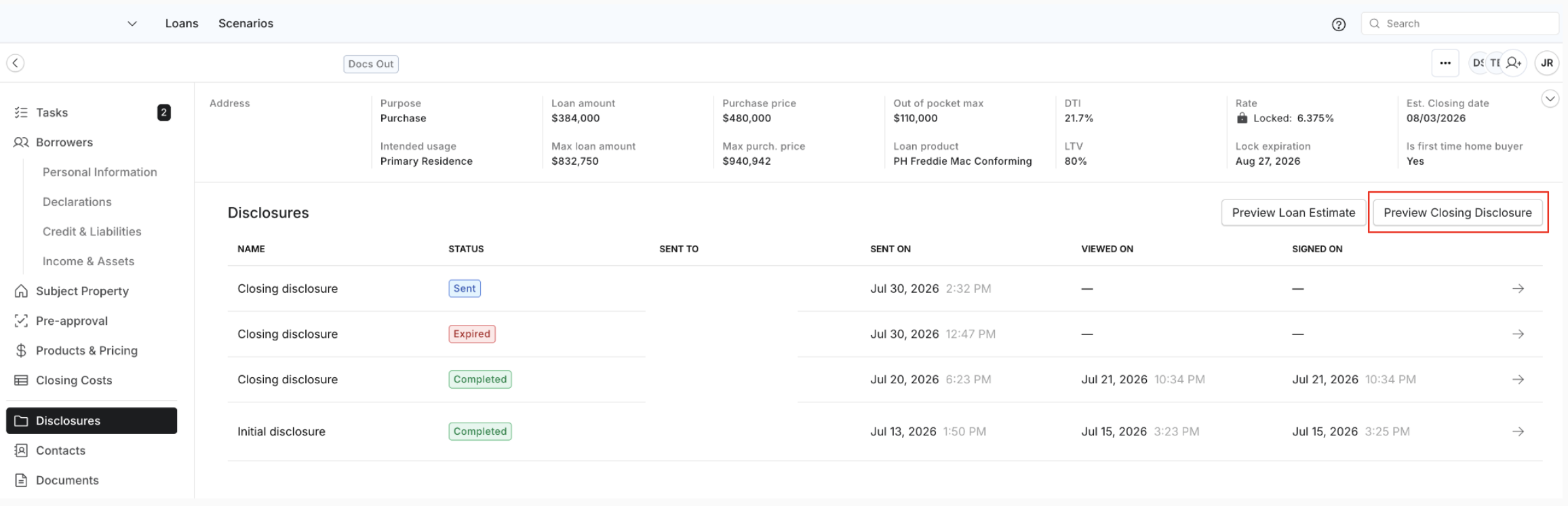
Closing Disclosures can be previewed directly within Command Center. This allows loan team members to review the latest version of the CD.
To preview a CD:
Open the loan in Command Center
Select Disclosures from the loan navigation
Click Preview Closing Disclosure
Notes:
The Preview Closing Disclosure button only appears after an Initial Closing Disclosure (ICD) has been sent
The preview always reflects the latest version of the CD on file
This is a preview only — nothing is sent to the borrower
To provide feedback on the CD: Submit a support ticket at pylonlending.support.site and select “Request a Closing Disclosure” as the issue type. Include the loan number and details of the requested changes.
Where do I find income, credit, assets, and compliance documents?
Disclosures are made available in the ‘disclosures’ tab in the Command Center. All credit, income, asset and compliance documents are located in the Documents tab
All Asset and Income calculators used for the file are located in the Documents Tab
What does the loan officer sign, and what does the borrower sign?
The loan officer signs the Initial Disclosures in Command Center. The loan officer does not sign the Closing Disclosure or closing documents — those are signed by the borrower in Elements.
Once the borrower signs the Initial Disclosures, do order-outs begin even if the loan is not yet locked?
Yes. Once the Intent to Proceed (ITP) is signed, processing begins and Pylon proceeds with all necessary order-outs (appraisal, title, etc.), regardless of whether the rate has been locked.