
Loan Stage Actions Required
Loan Stages in the Command Center:
Account Created
The Account Created stage is the initial intake stage and occurs before a credit pull or any attempt to run a pre-approval check.
At this point:
A borrower profile has been created in Elements.
Credit has not yet been pulled.
No automated pre-approval evaluation has been run.
No product eligibility has been determined.
Pylon is not actively working the file.
This stage reflects that the loan has been initiated but has not yet entered qualification review.
Action Required:
The Loan Officer should first assign themselves to the loan file in Command Center.
Then, navigate to ‘tasks’ in the borrower’s profile and work with the borrower to complete the application. Completion of all tasks will initiate the credit pull and/or pre-approval check.
Once credit is pulled and the system evaluates eligibility, the file will move to either Pre-Approval or Manual Review Needed, depending on the borrower’s eligibility.
Manual Review Needed
The Manual Review Needed stage indicates that, based on the borrower’s current profile, they are not presently eligible for any available product structure.
This status signals to the Loan Officer that the borrower must provide additional information before qualification can proceed.
Common reasons include:
Insufficient income relative to liabilities
High debt-to-income (DTI) ratio
Insufficient assets or reserves
Credit score below program minimums
Incomplete or inconsistent application data
At this stage:
The system was unable to identify an eligible product structure.
The loan cannot advance to Pre-Approval.
Underwriting cannot be initiated.
Action Required:
The Loan Officer must work with the borrower to strengthen the file (e.g., adjust structure, increase down payment, add a co-borrower, reduce liabilities, correct data).
Once eligibility requirements are met, the loan can be re-evaluated and move forward to Pre-Approval.
A "Manual Review Needed" status indicates the file as currently structured does not meet eligibility for any available product, but it does not preclude proceeding with Pylon. The loan officer can update income, assets, or co-borrower information, correct missing data, and rerun pre-approval as many times as needed. Pre-approval evaluations are instant and may be retried freely.
Pre-approval
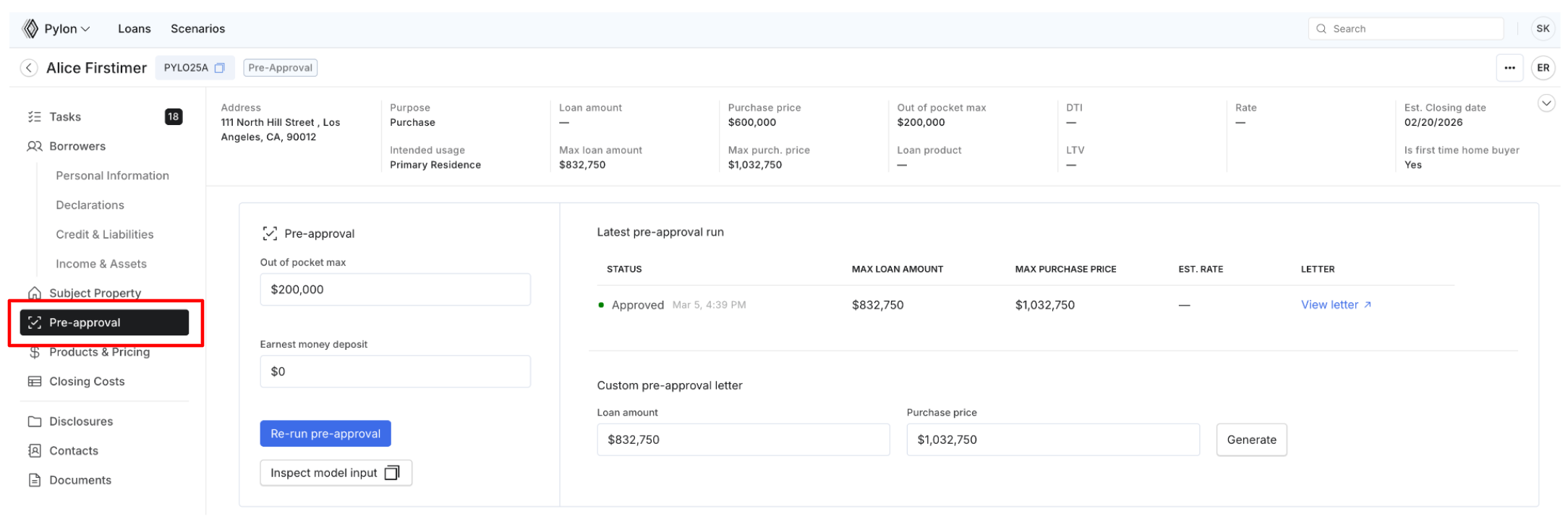
The Pre-Approval stage begins after credit is pulled and the system identifies at least one eligible product structure.
At this stage:
The borrower qualifies for one or more available loan products.
Maximum loan amount and estimated property value are calculated.
No underwriting review has occurred.
Action Required:
The Loan Officer must:
Review eligibility results in the Pre-Approval tab.
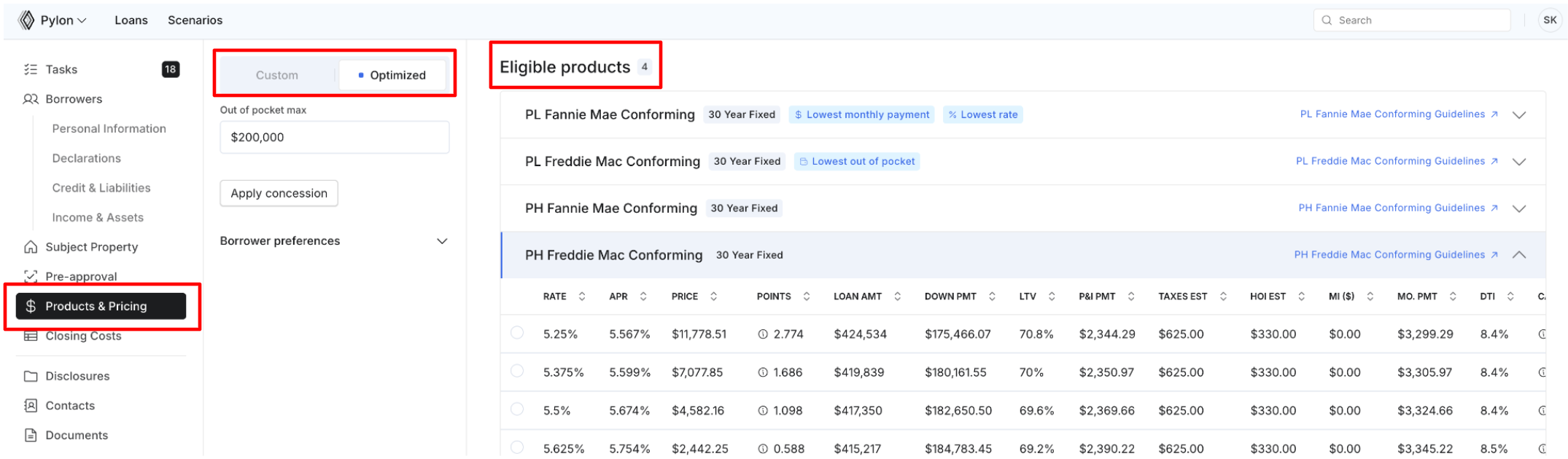
Structure and select a product in Products & Pricing. Here, you will have the ability to select from a custom or optimized structure.
Product Guidelines
Product guidelines are linked directly to each product within Command Center.
Pylon does not apply overlays beyond the published program guidelines.
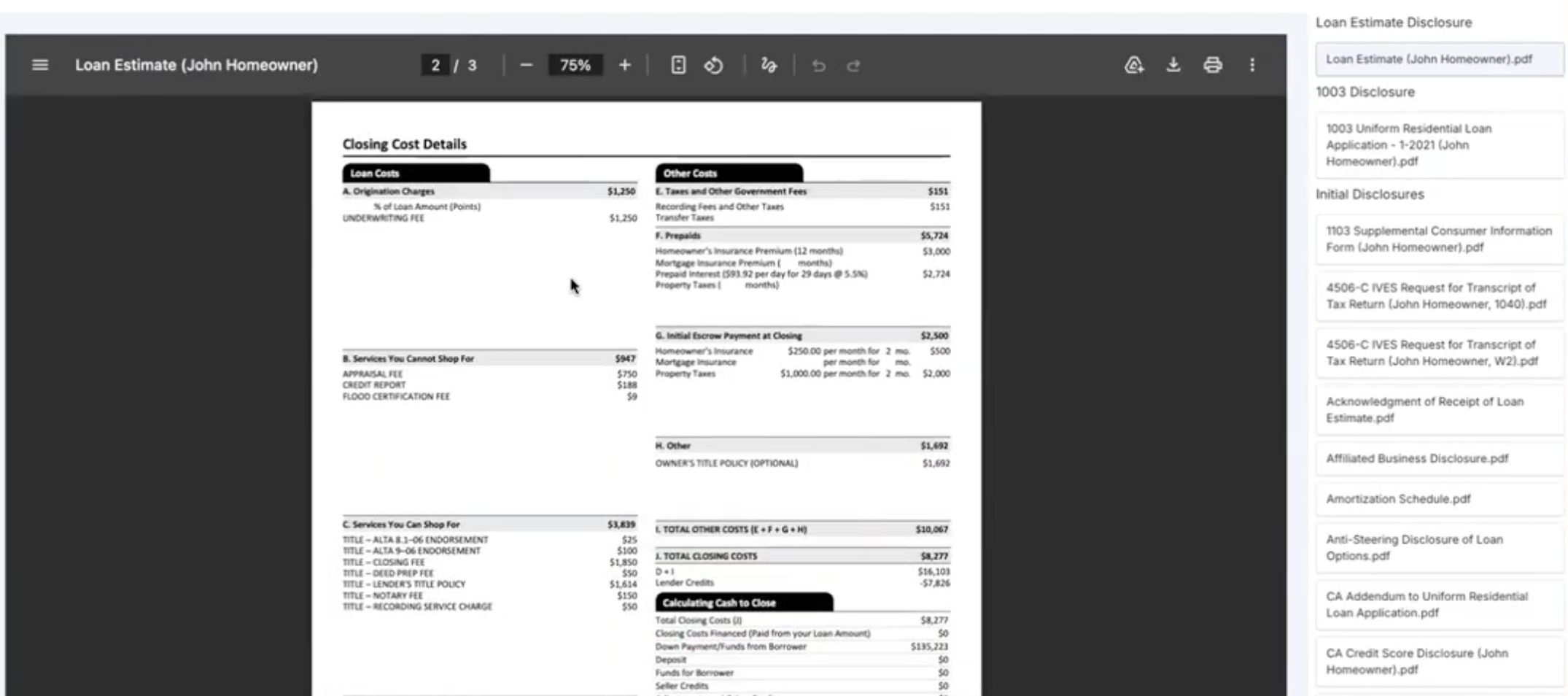
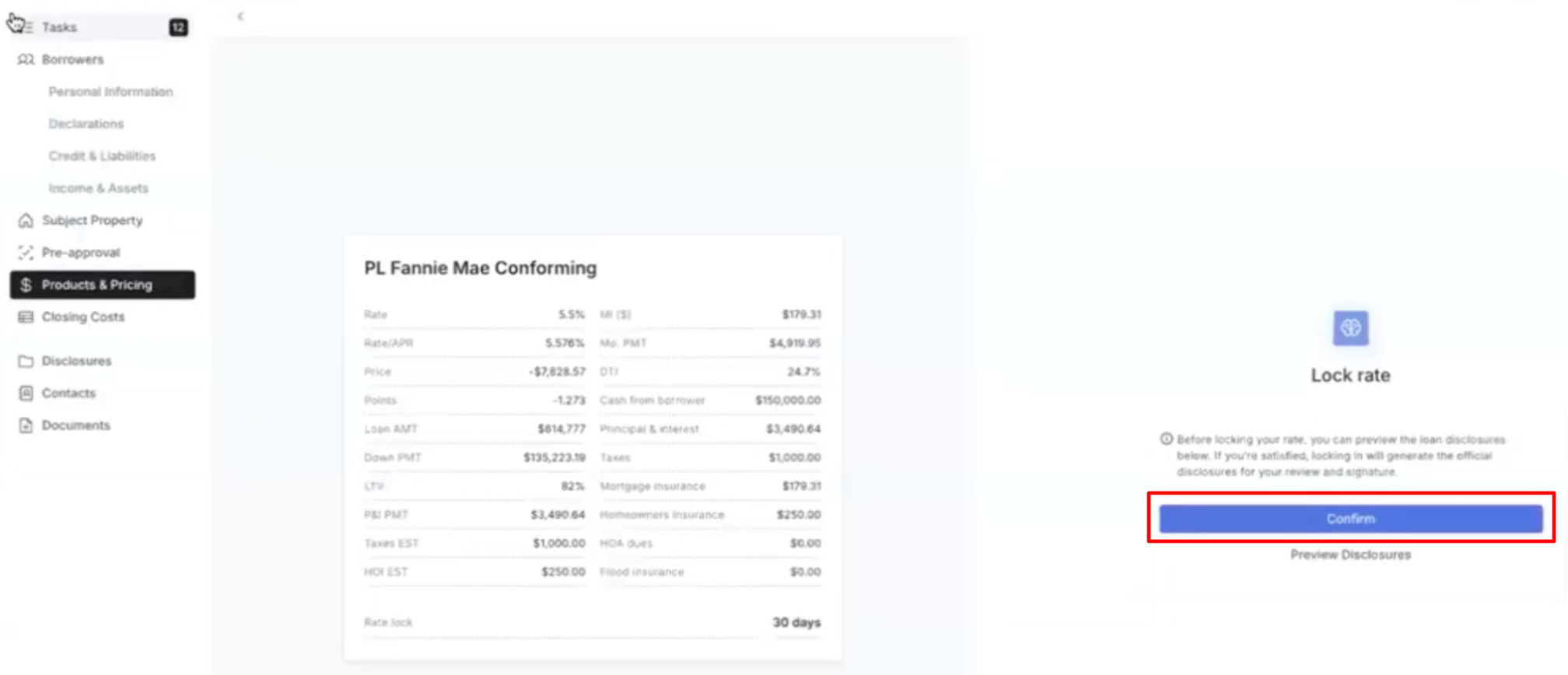
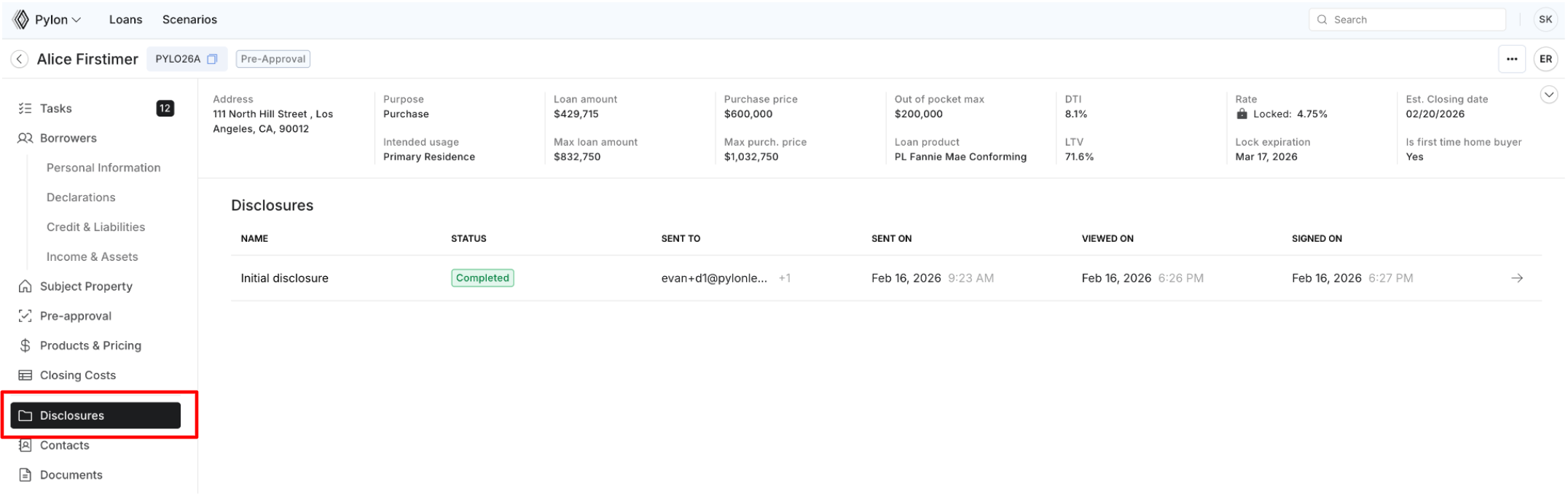
Preview disclosures.
Lock or float the rate.
Complete disclosures.
Disclosures & Intent to Proceed (ITP)
Before underwriting can begin, initial disclosures must be completed.
Disclosures are automatically generated and can be previewed in Command Center.
The Intent to Proceed (ITP) is included in the initial disclosures package.
Disclosures must be signed first by the LO and then by the borrower to obtain the ITP.
LOs sign in Command Center, and borrowers sign in Elements.
LOs and borrowers will receive daily reminder emails to sign for 10 days
Pylon cannot begin underwriting without a signed ITP. Loan changes may still be made after the ITP is received.
Once the disclosures are signed, the file must be submitted to underwriting to begin review.
Processing
The Processing stage is a temporary return status and occurs only if underwriting sends the file back due to a missing or incomplete Intent to Proceed (ITP).
At this stage:
The file is paused until the ITP issue is resolved.
Action Required:
Ensure the ITP is properly completed and signed. Once resolved, the file must be resubmitted to underwriting to proceed.
Underwriting
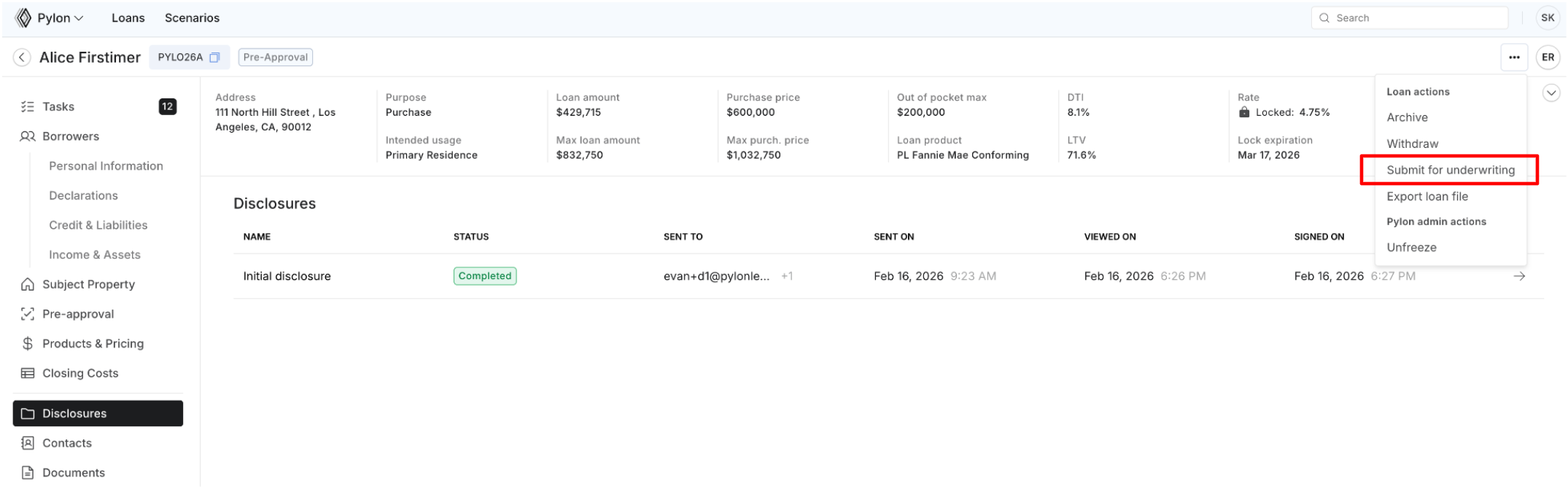
The Underwriting stage begins only after disclosures are signed and the file is formally submitted for review.
Pylon does not begin processing a loan automatically - it must be manually submitted.
How to Submit:
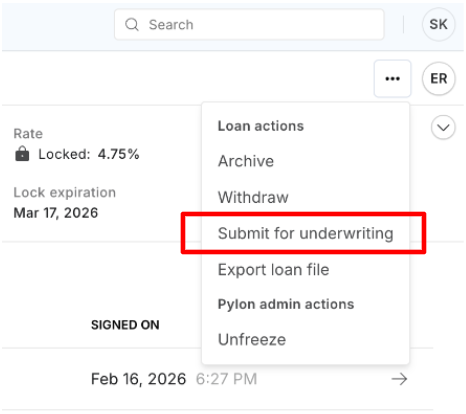
From the file view in Command Center:
Click “Submit for Underwriting” in the “…” menu (top right corner).
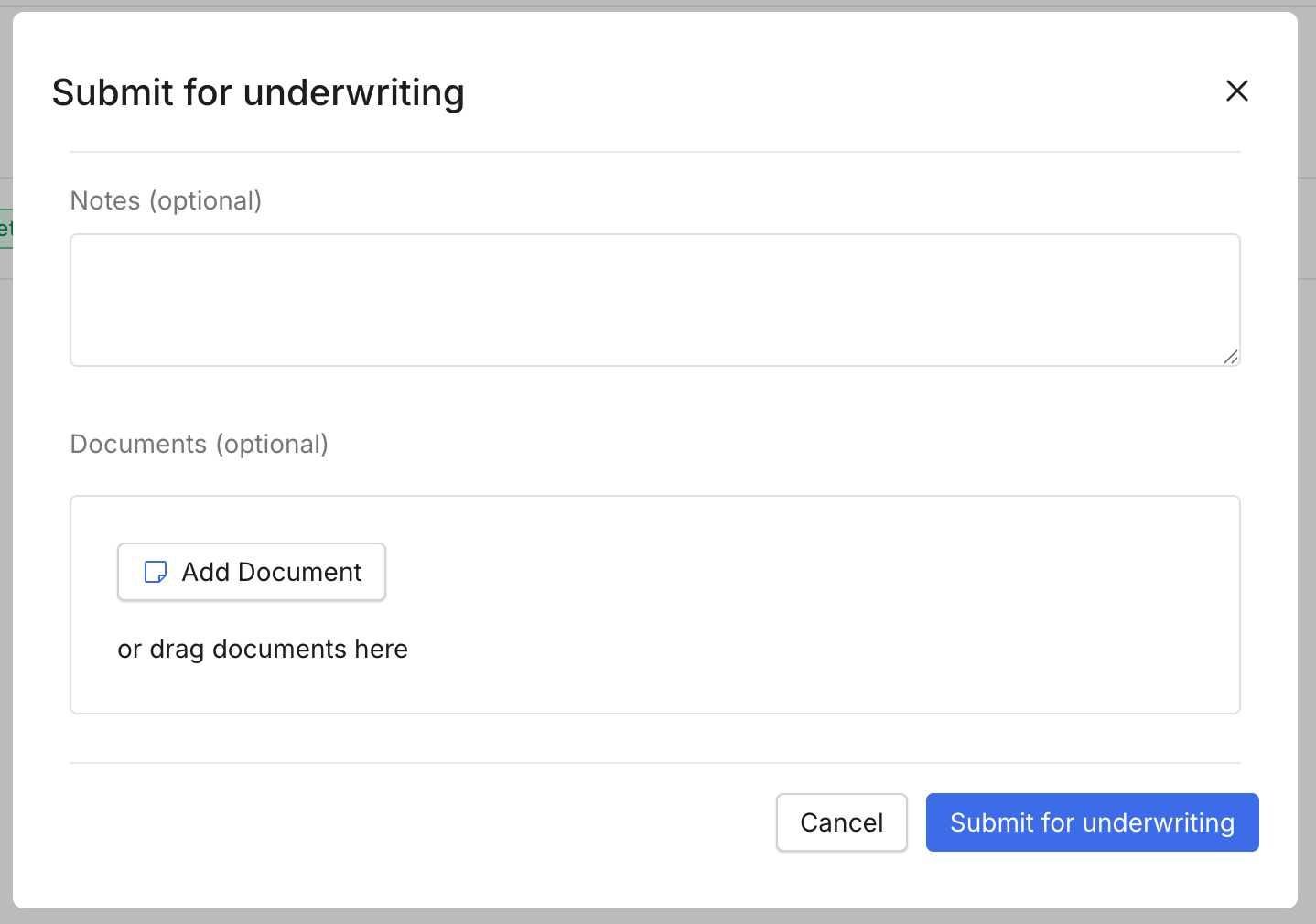
At submission, you may include:
Comments or special instructions
Requests (e.g., delay appraisal order until approval)
Supporting documentation uploads (e.g., letters of explanation for gift funds, employment changes, etc.)
Key Operational Rules:
If a loan is not in Underwriting status, Pylon is not actively working the file.
As a general rule: if you want Pylon to review a file and it is not in Underwriting, you must resubmit it.
Pylon’s underwriting SLA is 24 hours, though reviews are often completed sooner.
SLA begins when a file is formally submitted to Underwriting via Command Center. Reviews often complete sooner.
If a submission is incomplete and cannot be underwritten, the file will be moved back to the Processing milestone until the required documentation is provided.
To begin the underwriting review, the file must contain sufficient supporting documentation to allow the underwriter to evaluate the loan. Common reasons a file may be returned to Processing include missing income documentation, asset documentation, a purchase contract (if applicable), or other required underwriting documentation.
Minimum required documentation:
Government-issued ID
Income documentation
Asset documentation
Purchase contract (if applicable)
Credit report
Signed disclosures or Intent to Proceed (ITP)
Conditional Approval
After underwriting review, a file may move to Conditional Approval. This means the loan is approved subject to additional items being satisfied before it can proceed.
At this stage:
Conditions are issued and appear as tasks.
Tasks may be borrower-facing or LO-facing.
LO-facing tasks are not visible to the borrower but may be reassigned if appropriate.
The loan cannot move forward until all conditions are cleared.
Action Required:
Complete and/or upload documentation to satisfy all conditions.
Once conditions are met, the file must be resubmitted to underwriting for review of the newly provided documentation.
If the file is not in Underwriting, Pylon is not actively reviewing updates.
Initial Closing Disclosures will automatically generate once required milestones are met.
Pre-CTC QC
If the loan is approved by underwriting, the file moves to the Pre-CTC QC milestone for a final quality control review prior to Clear to Close.
At this stage:
A final compliance and documentation review is performed.
No new conditions are issued unless discrepancies are identified.
Turn Time:
QC SLA is 48-72 hours after submission, excluding weekends and holidays.
For files submitted to Pre-CTC QC after 3:00 PM ET, the SLA clock starts on the next business day.
The loan cannot move to Clear to Close until QC review is completed.
Clear to Close
Once all conditions and QC requirements are satisfied, the loan moves to Clear to Close. Pylon prepares the closing document package based on the closing dates reflected in the system and in accordance with applicable TRID timelines and waiting periods.
Document preparation SLA is 24-48 hours, excluding weekends and holidays.
Docs Out
Once the closing package is finalized and balanced, the loan moves to Docs Out.
At this stage, the completed closing document package has been sent to Title for closing.
Funded
After closing, Pylon reviews the executed closing package.
Once the documents are approved and all funding requirements are satisfied, the loan is marked Funded.